For agents
Documentation your coding agents can write to
Your agents already write documentation. It ends up in a pull request nobody reads, or pasted into a chat that scrolls away. Bladbase gives them somewhere durable to put it — and gives you somewhere to say yes or no.
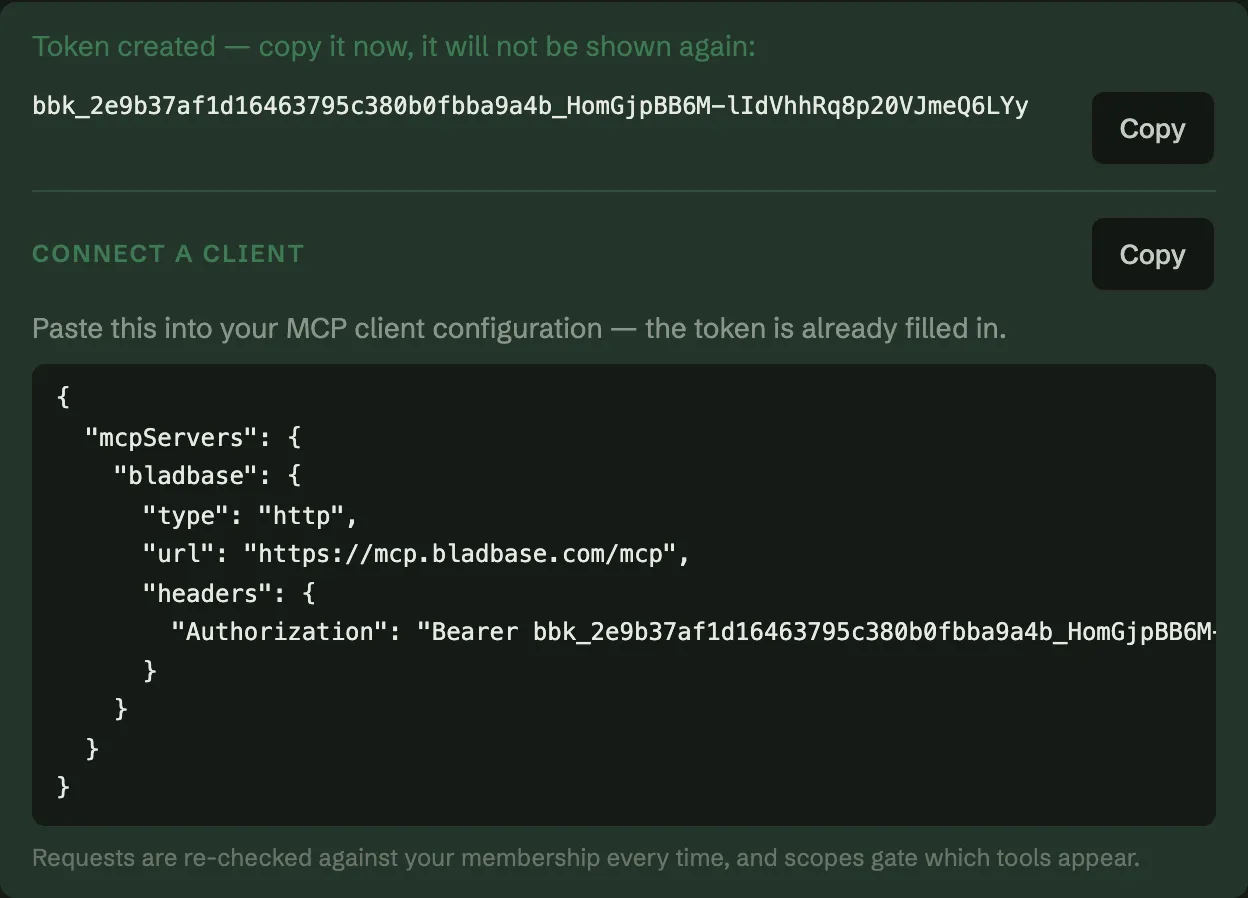
Connect a client in a minute
Mint a token in workspace settings and paste the configuration it hands you. That is the whole setup: no OAuth app to register, no scraping, no shared human login.
What it can do
Search
Snippets, stable ids and heading anchors — filtered by what that member may read.
Read
A page as Markdown with its frontmatter, or one section by anchor.
Write
Create or update a page, change a section, tick a task, move a status.
Ask
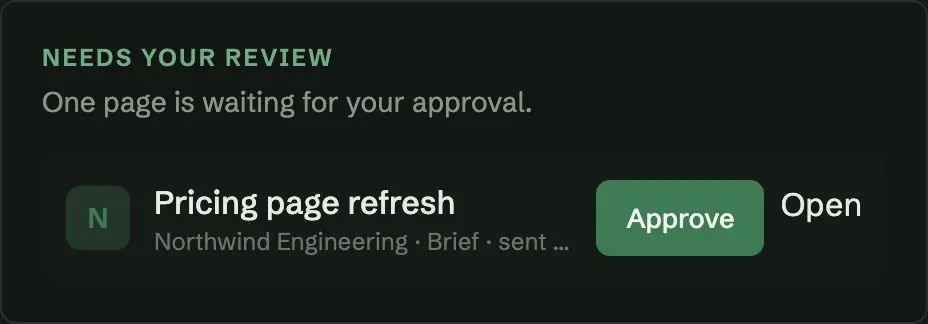
Send a brief for review, and let a person decide before it counts.
The full tool list, with every parameter, lives atthe developer reference — generated from the running service, so it cannot drift from what the server actually accepts.
And what it cannot
An agent with write access to your documentation is only a good idea if the limits are real. These are enforced on the server, on every call.
It writes as itself
A token binds one person, or one system, to one workspace. The trail reads “MarketPilot drafted · you approved”, not both as you — and revoking the token stops it mid-sentence.
Your roles still decide
Every call re-checks membership on the server. A viewer’s token cannot write, a writer’s cannot publish, and scopes gate which tools even appear.
It cannot overwrite you
A page open in the editor is refused rather than clobbered, and an agent edits the section it owns or ticks one task instead of replacing a page it did not write.
Approval means something
A brief waits at “awaiting review” until a person approves it, and any later edit withdraws that approval. Reading `status` alone will not fool a careful client.
A person still decides
When an agent asks for review, the people who can approve it are told, and it waits. Approving takes one click from your home screen — no editor, no hunting through a tree.
House rules, in the workspace
Every workspace is seeded with guidance pages an agent reads before its first call, and any page can be marked as guidance. Conventions live where the work lives, so a new client picks them up without anyone briefing it.
Configuring an MCP client
Every client needs the same three things: the endpoint, a bearer token, and a name. This is the whole file for Claude Code — .mcp.json at the root of your project.
{
  "mcpServers": {
    "bladbase": {
      "type": "http",
      "url": "https://mcp.bladbase.com/mcp",
      "headers": {
        "Authorization": "Bearer bbk_<token id>_<secret>"
      }
    }
  }
}
The token is shown once, when you mint it, and it carries the workspace inside it. The same endpoint reaches a different workspace when you swap the token — which means a token from the wrong workspace connects successfully to the wrong place. Ask the server which workspace it resolved to before trusting it.
Questions people actually ask
How do I connect Claude Code to Bladbase?
Mint a token in workspace settings, then add the server to your MCP client configuration. The endpoint is the same for every workspace; the token decides which workspace you reach and what you may do in it.
Can an agent write to my documentation without impersonating a person?
Yes. A token can bind to a service member rather than a user, so the trail reads “MarketPilot drafted · you approved” instead of recording both as you. Revoking the token stops it immediately.
What stops an agent overwriting a page someone is editing?
The write is refused, not merged. While an editor is connected, the live document in that room is the authority, and an API write beneath it would be silently lost — so Bladbase rejects it and tells the caller why.
How is role-based access control applied to AI clients?
The same way it is applied to people. Every call re-checks workspace membership on the server, so a viewer’s token cannot write and a writer’s cannot publish. Scopes narrow it further: a read-only token never sees the write tools at all.
Does search respect permissions?
Yes. Results are filtered server-side by the membership the token resolves to, against a permission-aware index. A client never receives snippets from a page that member could not open.
What is the Model Context Protocol?
An open protocol for connecting AI clients to tools and data. Bladbase implements it over Streamable HTTP with the official TypeScript SDK, so any compliant client can connect without a Bladbase-specific plugin.
References
- Model Context Protocol specification — the protocol this implements
- MCP TypeScript SDK — the official SDK the service is built on
- JSON-RPC 2.0 — the message format MCP carries